Broadbent Cloud
Desktopquestions
Questions
Frequently asked questions
- What does the desktop app do?
It backs up folders you choose on this computer to a Broadbent Cloud drive. It uses the same sign-in as the customer portal and shows each drive’s quota.
- Which systems can I install it on?
Windows, macOS (Intel and Apple silicon) and Linux. Download the installer for the computer you are using.
- macOS says Broadbent Cloud.app is damaged
macOS shows this when the app was downloaded in a browser. The file is not corrupted. The current macOS build is not yet notarized by Apple, so Gatekeeper blocks it.
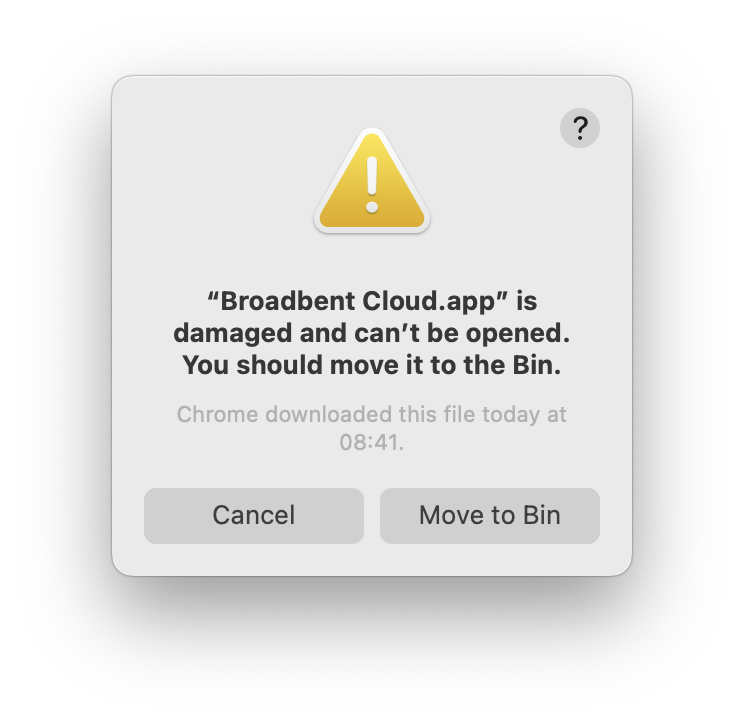
Copy Broadbent Cloud into Applications if it is still on the disk image. Open Terminal and run:
find "/Applications/Broadbent Cloud.app" -print0 | xargs -0 xattr -cThen open Broadbent Cloud from Applications. On an older Mac, this command does the same thing:
xattr -cr "/Applications/Broadbent Cloud.app"- How does a backup connect?
Drive owners, including the free 1 GB plan, sync through the S3 gateway. The access key, secret and bucket are already on the storage account and are returned after sign-in. Team members do not receive S3 keys. A drive they can write to is backed up over WebDAV instead.
- Who can start a backup?
The drive owner, and team members with write access to a folder. Read-only access can see the drive in the app, but cannot start a backup.
- Where are passwords stored?
Passwords and S3 secrets stay in memory for the backup that needs them. The refresh token is stored with the operating system’s encryption when that is available.
- Does the app keep running when I close the window?
Yes. Closing the window leaves it in the menu bar on macOS or the system tray on Windows and Linux. Quit is on that menu.
- How do I get more space?
Storage is the drive plan, not a separate desktop licence. Start with 1 GB free, or choose Personal or Team capacity on the plans page. You can also adjust the plan from the app.
- Can I browse the files in a browser?
Yes. Open Drive from the app, or go to drive.broadbent.cloud. The Drive page describes the web file manager.
Contact
Speak to the team
Call our Colchester sales team, or send a message anytime.
UK sales team · 8:00am–8:00pm